

Core web vitals guide

Core Web Vitals measure loading, responsiveness and visual stability through three metrics: LCP, INP and CLS. Start with the metric that fails in field data, then use a lab report or interaction recording to investigate it.
A Lighthouse Performance score answers a different question. It summarizes one lab test. Use field data to assess real-user Core Web Vitals.
What are the Core Web Vitals thresholds?
| Metric | Measures | Good | Needs improvement | Poor |
|---|---|---|---|---|
| Largest Contentful Paint (LCP) | When the largest eligible visible content renders | ≤2.5 s | >2.5 s and ≤4 s | >4 s |
| Interaction to Next Paint (INP) | Responsiveness to clicks, taps and keyboard interactions | ≤200 ms | >200 ms and ≤500 ms | >500 ms |
| Cumulative Layout Shift (CLS) | Unexpected layout movement | ≤0.1 | >0.1 and ≤0.25 | >0.25 |
These field thresholds apply at the 75th percentile, with mobile and desktop assessed separately. For example, good LCP means at least 75% of the recorded LCP measurements are 2.5 seconds or faster. The percentile counts measurements rather than unique visitors.
CLS has no time unit.
Read the scope before the result
PageSpeed Insights (PSI) shows field data from the Chrome UX Report (CrUX), where enough eligible data exists. Check the selected device, URL or origin, and collection period before interpreting its assessment.
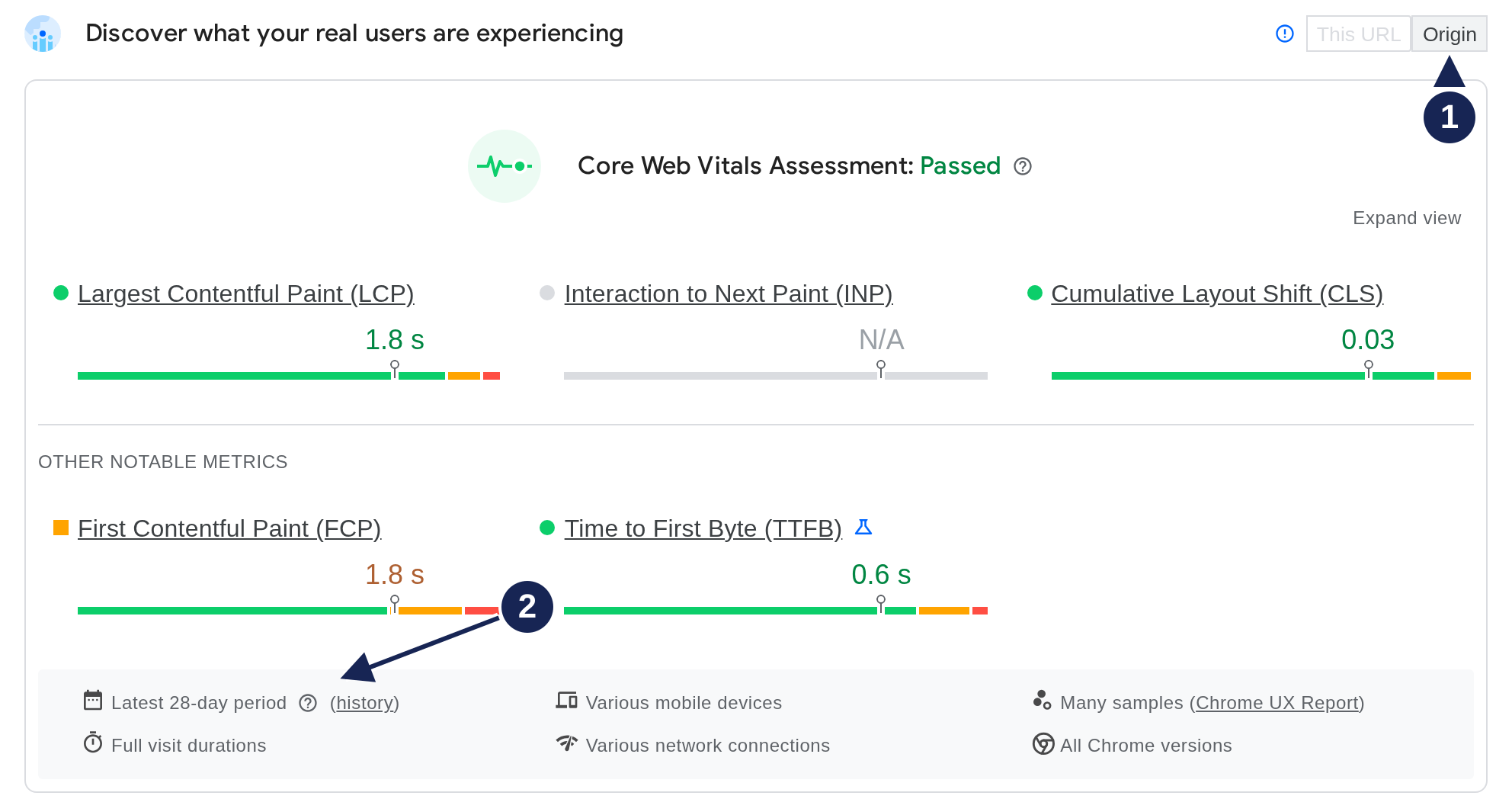
Open field screenshot at full size.
- Origin is selected. The This URL option is disabled. The results describe the origin aggregation, so they do not prove that this individual page passes.
- The period covers the latest 28 days. These measurements combine eligible real-user experiences across that period, rather than testing the page when you open the report.
The report shows LCP of 1.8 s and CLS of 0.03, both good. INP is N/A, yet the assessment says Passed. PSI allows an assessment from LCP and CLS when there is insufficient INP data. That exception does not establish good responsiveness. If either LCP or CLS lacks sufficient data, PSI cannot provide an overall assessment. Google documents these assessment rules.
Choose what to investigate
LCP: find the content that renders late
LCP measures the largest eligible visible image, text block or video as the page loads. It does not mean every important resource has finished loading.
Find the actual LCP element before choosing an image fix. A paragraph can be the LCP element. Then inspect the timing breakdown: server response, resource discovery, resource transfer and rendering can each delay it.
The LCP guide walks through a real text-element report and explains which timing to investigate next.
INP: reproduce the slow interaction
INP measures responsiveness through the next paint after clicks, taps and keyboard interactions. It includes waiting for the main thread, running event handlers and presenting the next frame. It does not measure the completion of an asynchronous request, such as downloading search results. Scrolling alone is outside its interaction scope. See the INP definition.
Record the interaction that feels slow, such as opening a menu or changing a filter. Look for work that delays the event handler or the next frame. A navigation-only Lighthouse audit does not perform these interactions, so it cannot establish INP.
CLS: reproduce movement after loading too
CLS measures unexpected layout shifts. It reports the largest cluster of shifts within a session window, rather than adding every shift over the page's lifetime. A window groups shifts less than one second apart and lasts at most five seconds. See how CLS is measured.
Watch for images, ads or embeds appearing without reserved space. Also check whether a font change moves text. Reproduce the page states people encounter, including content that appears after the initial load. A short loading audit can miss those shifts. The CLS diagnosis checklist helps you record the full visit.
Use lab data to diagnose, then verify in the field
Once you know the failing metric and device group, investigate a representative page under relevant conditions. Keep the device, network settings and tested page consistent when comparing local runs.
Our PageSpeed Insights versus Lighthouse guide shows why a field assessment and a lab result can differ, using actual reports from the same site.
After deploying a fix, repeat the local test to check the intended behavior. Then monitor the same field scope and device group. PSI's trailing 28-day window still contains older measurements, so a deployed fix does not immediately replace the whole distribution.
What if field data is missing?
Missing CrUX data does not mean a page passes or fails. PSI needs enough eligible data to report a result. If it falls back to the origin, use that wider result as context while investigating the individual page.
Lab testing still helps you find problems without CrUX coverage. For evidence of actual interactions and page experiences, collect real-user measurements with an appropriate monitoring setup.
Do Core Web Vitals affect rankings?
Google says its ranking systems use Core Web Vitals. It also says good results do not guarantee top rankings. Google's page experience guidance gives no formula for turning a timing improvement into a ranking gain.