

Largest Contentful Paint (LCP): find the element and fix delays

Largest Contentful Paint (LCP) measures the time from navigation until the largest eligible visible content renders. A good field result is 2.5 seconds or less at the 75th percentile, assessed separately for mobile and desktop.
To improve a slow result, find the actual LCP element first. Then use its timing breakdown to decide whether to investigate server response, resource loading or rendering.
What does LCP measure?
The browser considers eligible images, text blocks and video content in the viewport. Candidates include image elements, URL-based background images, and a video's poster or first frame. Browser heuristics exclude some elements, so the largest object you notice is not automatically the reported LCP element. Google documents eligible LCP content.
The candidate can change as larger content renders. Reporting stops after user interaction; the page's load event is not the final boundary. LCP also does not establish that all main content has finished loading.
| Field LCP | Rating |
|---|---|
| ≤2.5 s | Good |
| >2.5 s and ≤4 s | Needs improvement |
| >4 s | Poor |
These thresholds apply to the 75th percentile of field measurements. A single local run below 2.5 seconds does not prove that a page passes for real users. The Core Web Vitals guide explains how to read the field assessment.
Find the element in your report
Open LCP breakdown in a Lighthouse report and inspect the element shown below the timing rows. In this actual run of https://unlighthouse.dev/, Lighthouse selected a paragraph.
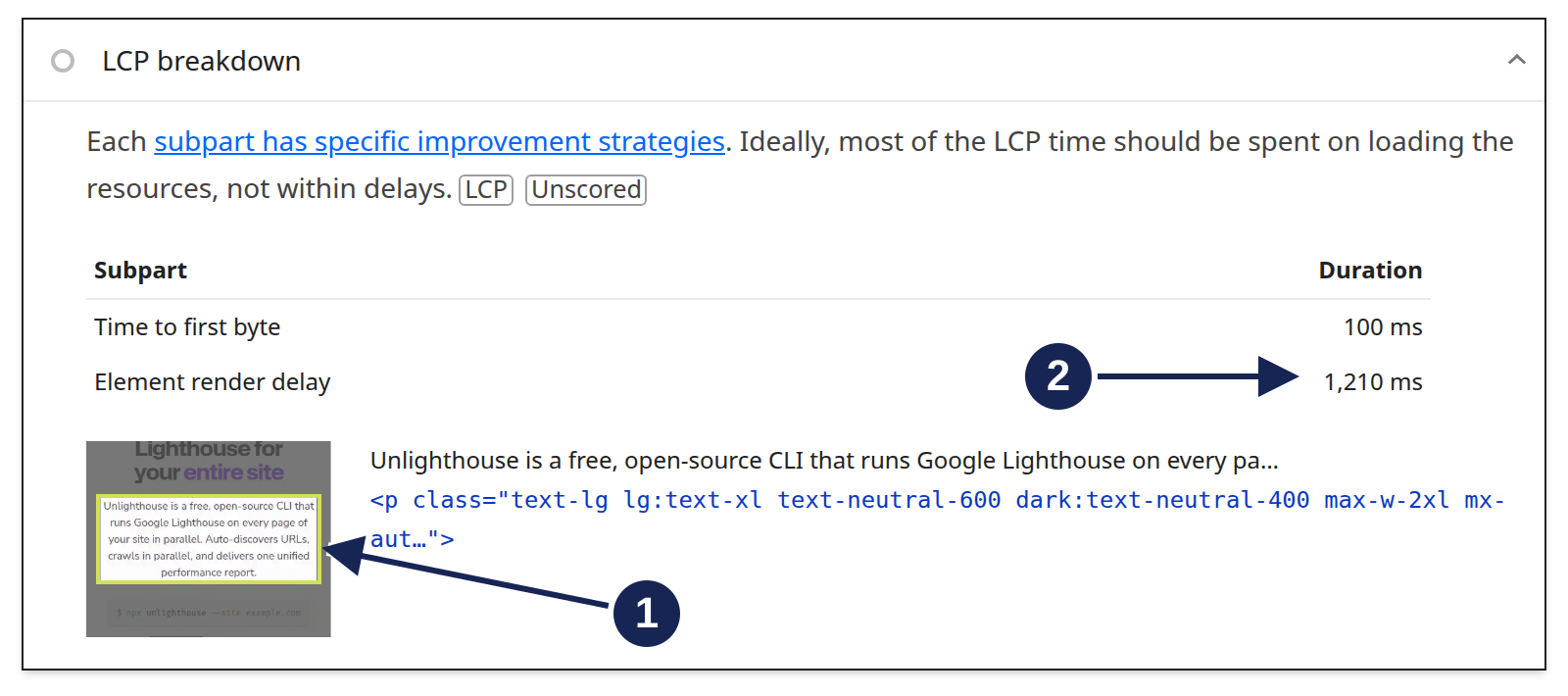
Open LCP breakdown at full size.
- The selected element is text. The thumbnail highlights the paragraph, and the node below the timings identifies it. An image compression change would not directly address this selected element.
- Element render delay is the larger row. The report displays 100 ms for time to first byte and 1,210 ms for element render delay. The report's overall LCP metric was 1.3 s; that headline is outside this crop.
These are rounded values from one local run, not a benchmark. The long render phase tells us where to investigate next. It does not prove which stylesheet, script or other dependency caused the delay.
Read the LCP timing breakdown
The LCP breakdown insight separates the loading path into four phases:
| Phase | What it measures | First question |
|---|---|---|
| Time to first byte (TTFB) | Navigation start to the first response byte | Is the document response arriving late? |
| Resource load delay | First response byte to the start of the LCP resource request | Can the browser discover and request the resource early? |
| Resource load duration | Time spent loading the LCP resource | Is the transfer taking too long? |
| Element render delay | Resource completion to rendering the LCP element | What prevents the ready content from painting? |
If the element needs no resource load, the resource phases are zero and render delay begins after TTFB. The captured report shows only TTFB and element render delay. There are no separate resource-loading rows in this report.
Text LCP can still depend on a web font. A text element alone does not mean resource loading is irrelevant. Check the selected element's actual dependencies and the rows your report provides.
The insight explains the timing; it has no pass or fail result. Google's LCP optimization guidance also warns against turning suggested phase proportions into fixed millisecond budgets.
Common LCP issues
Match the next check to the slow phase. A large phase narrows the search; you still need evidence of the cause.
| Observed delay | What to inspect next |
|---|---|
| Late document response | Server response, redirects, cache behavior and connection time before the first byte |
| LCP resource requested late | Resource discovery and priority, and whether lazy loading delays the LCP image |
| Long resource transfer | Image size, dimensions and format, and the network connection |
| Content ready but rendered late | Render-blocking resources, main-thread work, font dependencies and client-side rendering |
For an image LCP, avoid lazy loading that image. Make it discoverable early and consider its request priority. Increasing every image's priority does not identify which resource matters. Google's image LCP guidance explains discovery and priority together.
For the paragraph shown above, record a performance trace and examine main-thread work and dependencies around the paint. The breakdown alone cannot tell you which of those causes applies.
A smaller resource does not always produce an earlier LCP. If the element still waits for rendering, saved transfer time can become render delay instead. Check the overall timing after a change, as well as the phase you targeted.
Verify the change under comparable conditions
Repeat the same page test with the same device emulation, throttling method and browser setup. Record the selected LCP element too, because a change can make a different element the largest candidate.
The screenshot's run used mobile emulation without Lighthouse-added throttling. Its timings should not be compared directly with a simulated slow-network run as evidence that a code change helped.
Use field data to check whether real-user LCP improves for the affected URL and device group. PageSpeed Insights may show origin data when URL data is unavailable. An origin result gives wider context; it does not establish that an individual page passes. The PageSpeed Insights versus Lighthouse guide shows the scope and settings to check.
PSI's field data covers a trailing 28-day period. A fix enters that distribution gradually as newer experiences replace older ones.