

PageSpeed Insights vs Lighthouse: What's the difference?

PageSpeed Insights (PSI) runs Lighthouse on Google's infrastructure and shows available Chrome UX Report (CrUX) field data separately. Local Lighthouse gives you a lab report from your own test environment. CrUX does not contribute to either Lighthouse Performance score.
First, check which numbers you are comparing. The Core Web Vitals assessment covers real-user experiences over time. The Lighthouse Performance score comes from a lab test. Two lab scores can also differ when their environments or settings change.
Read the two sections of a PSI report
These captures show a mobile PSI report for https://unlighthouse.dev/ on 15 September 2026. The field assessment passed. The Lighthouse Performance score was 48. Here is how to read that report.
Field data: check the scope first
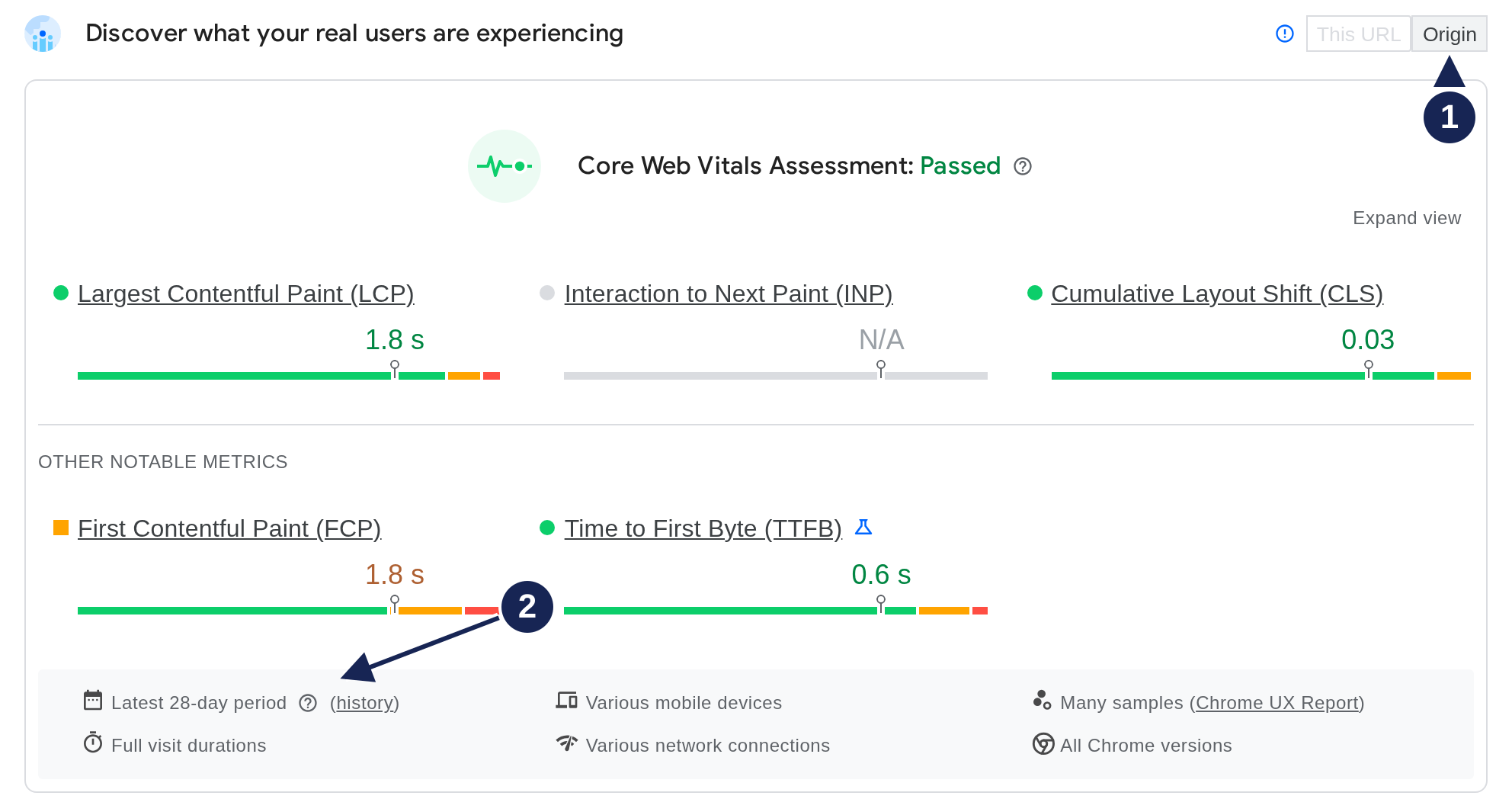
Open field screenshot at full size.
- Origin is selected. The This URL option is disabled, so the figures describe the origin across its pages. They do not establish the homepage's individual field performance.
- The collection period covers 28 days. This section aggregates eligible Chrome users' experiences. It describes previous visits rather than a new lab test.
PSI reports field metrics at the 75th percentile, or P75. For LCP, a P75 of 1.8 seconds means at least 75% of the measured page loads had an LCP at or below that value. The bars show how experiences spread across the good, needs improvement and poor ranges. Google documents the field report and its aggregation.
INP is unavailable in this capture. PSI can still pass the assessment when INP has insufficient data and both LCP and CLS have good P75 values. That pass does not establish good interaction responsiveness. The Core Web Vitals guide explains the three metrics.
Lab data: find the Lighthouse score
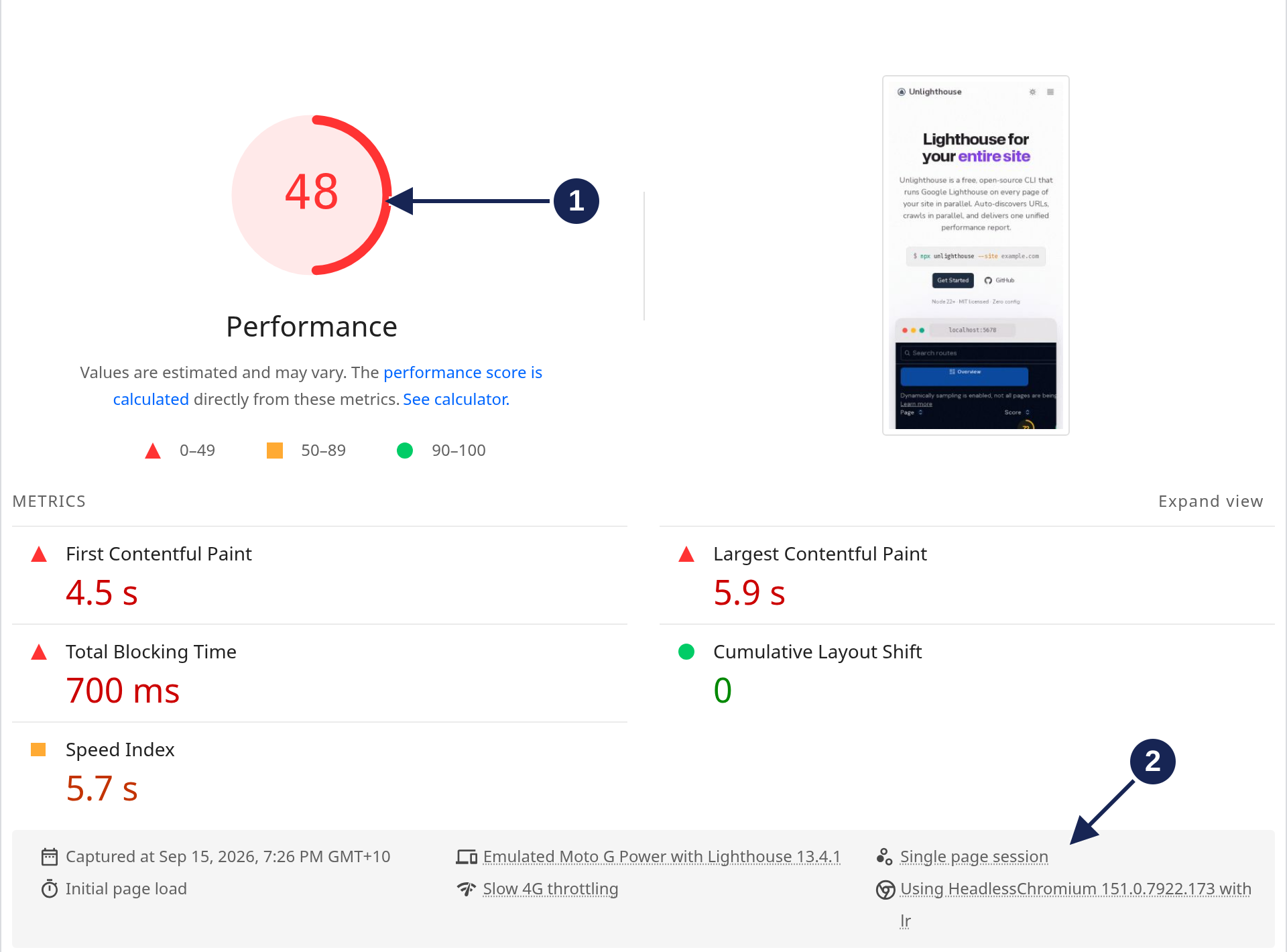
Open PSI lab screenshot at full size.
- 48 is the Lighthouse Performance score. It comes from the metrics collected for this lab test, including LCP of 5.9 seconds and TBT of 700 milliseconds.
- The environment appears below the metrics. Check the device emulation, throttling and Lighthouse version before comparing another report.
The field LCP of 1.8 seconds and lab LCP of 5.9 seconds describe different measurements. The field value covers mobile experiences across the origin over 28 days. The lab value comes from one homepage test. This pair alone cannot tell you which condition caused the gap.
Compare a local Lighthouse run
A separate local Lighthouse CLI run tested the same homepage shortly afterward. Its Lighthouse Performance score was 66.
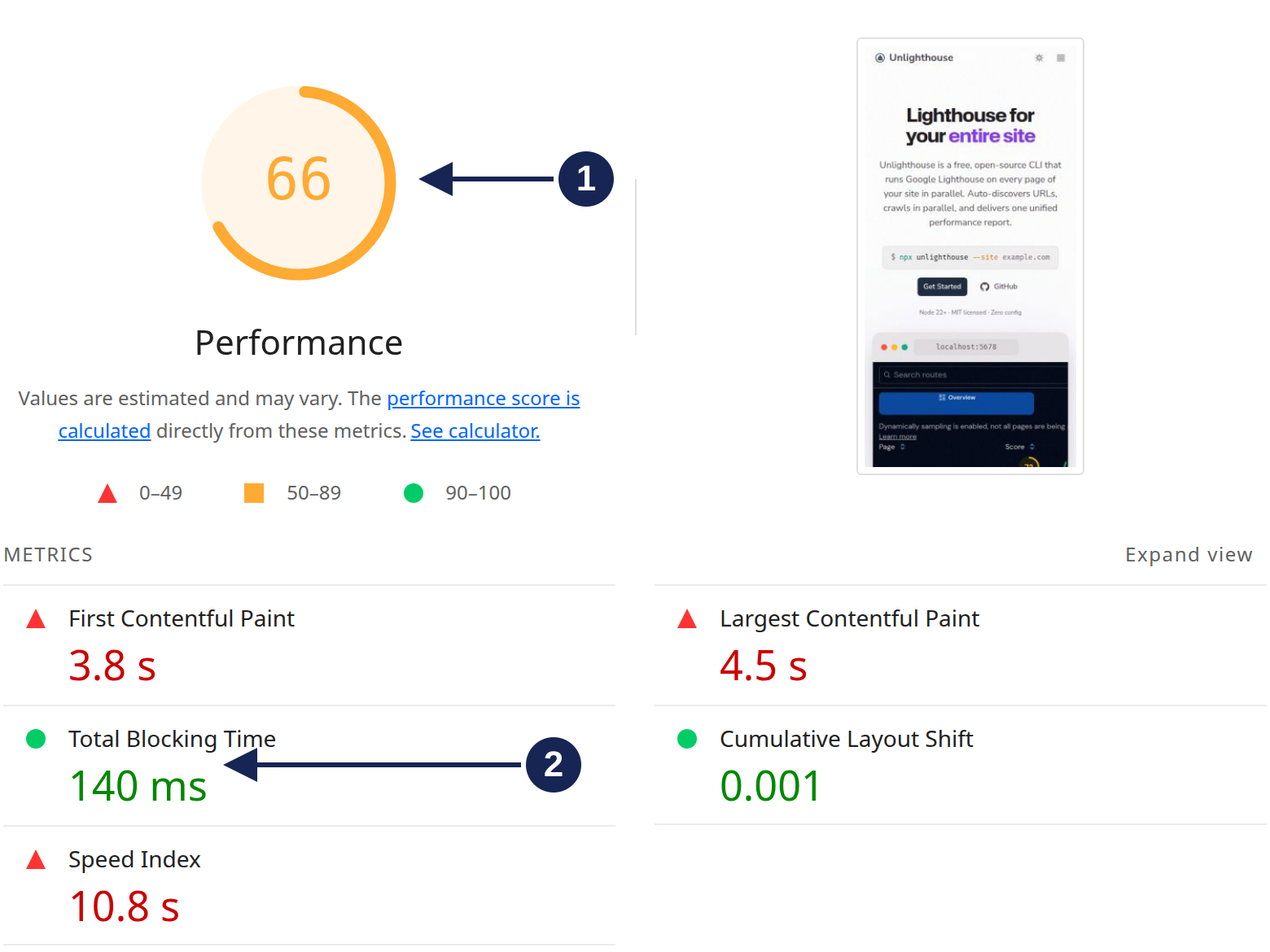
Open local report screenshot at full size.
- 66 is another lab score. Both reports used Lighthouse 13.4.1, but they ran in different environments and Chrome versions.
- TBT was 140 ms locally, compared with 700 ms in PSI. LCP also differed: 4.5 seconds locally and 5.9 seconds in PSI.
Each environment produced one run for this example. This was not a repeated benchmark. The higher local score does not prove that local Lighthouse is more accurate or that PSI is unstable.
Lighthouse calculates its Performance score from weighted metric scores. TBT carries 30% of the weight. That makes it worth inspecting here, though it cannot explain the score difference on its own. Google's scoring documentation covers the calculation.
Why Lighthouse scores differ
Lighthouse's variability guide describes several influences: page content, server responses, network conditions, browser behavior and competing processes. You can control some conditions locally. Scores can still vary.
Before investigating a score gap:
- Match the URL and device mode. Compare the same page and mobile with mobile, or desktop with desktop.
- Compare versions and settings. Check Lighthouse, Chrome, throttling and storage settings. In DevTools, inspect the Lighthouse panel's Clear storage option instead of assuming a warm or cold state.
- Reduce local interference. Check extensions and other work using the machine's CPU. Avoid concurrent Lighthouse runs.
- Repeat comparable tests. Keep each setup consistent and compare medians across several runs. Then inspect the metrics that changed.
Lighthouse uses simulated throttling by default, including in PSI. DevTools also offers request-level throttling. Switching modes changes the test; it does not guarantee lower or more realistic scores. See the official throttling guide and DevTools settings.
Choose the next check
| Your question | Useful next step |
|---|---|
| What did eligible real users experience? | Read PSI field data, checking the device, collection period and URL/origin selection. |
| Which part of this page load needs investigation? | Inspect the Lighthouse metrics and findings, then investigate the page in DevTools. |
| Did a code change affect lab performance? | Repeat tests with a consistent setup before and after the change. |
| Are interactions slow after the page loads? | Check field INP and investigate the affected interactions. A navigation audit's TBT does not establish their responsiveness. |
Total Blocking Time can indicate responsiveness problems during a loading test. It does not substitute for Interaction to Next Paint. A page with low TBT can still respond slowly when someone uses it after loading. Google explains that distinction.
FAQ
Why does PSI show no field data for my page?
The URL may lack sufficient eligible CrUX data. PSI can show origin data instead, or no field data if the origin also lacks enough samples. Google does not disclose a fixed minimum visitor count. A missing result does not mean the page is fast or slow. CrUX eligibility documentation explains the requirements.
Will a fix appear in PSI immediately?
A new lab run can test the changed page. Field data still describes the trailing 28-day collection period, so it includes experiences from before the fix. Check the selected scope before using that data to assess a particular page.
Is PSI the only way to see field INP?
No. The CrUX API also provides field metrics for eligible URLs and origins. PSI is one interface to that dataset; you do not need to treat its lab score as a measure of INP.
Bulk lighthouse testing
Run Lighthouse on your entire site with Unlighthouse. Limit pages with --maxRoutes, filter by URL pattern, and automate bulk audits.
Accessibility
Master web accessibility with Lighthouse. Learn how accessibility audits work, why they matter for users and SEO, and how to fix common issues.